SQL Queries and Joins Explained: How It Shows Up In Your SQL Assignments
If you're staring at a database assignment right now, you've probably typed "SQL joins" into Google more than once tonight. You're not alone. Almost every student who takes a database subject hits the same wall: queries make sense on their own, but joins feel like a different language. Let's fix that, one small piece at a time.
What Is an SQL Query?
An SQL query is just a question you ask a database. That's it. It’s like you writing a sentence to tell the database what you want to see.
For example, you have a table called 'Students', and it has columns like 'student_id', 'name', and 'course_id'. If you want to see every student's name, you'd write:
SELECT name FROM Students
In case you only want the students in course 101? Add a condition:
SELECT name FROM Students WHERE course_id = 101
Now, that's a full, working query. SELECT says what you want. FROM says where to look. WHERE says which rows count. Most of your assignment questions are just longer versions of this same pattern, so once this clicks, you're already halfway there.
What Are SQL Joins, and Why Does Your Assignment Keep Asking for Them?
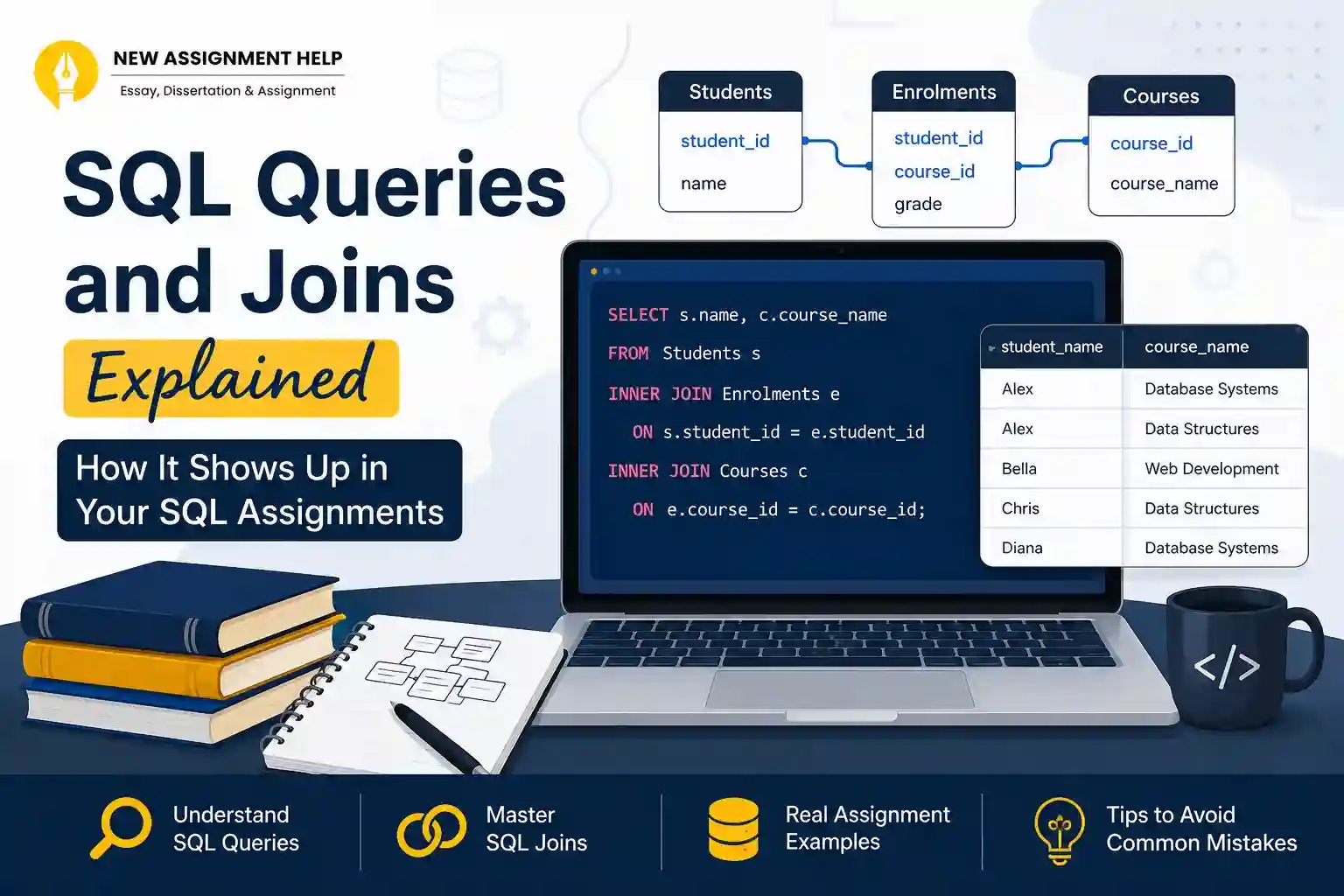
Here's the thing nobody explains well: your data almost never lives in one table. A university database won't cram students, courses, and enrolments into a single giant sheet. That would be messy and repetitive. Instead, each idea gets its own table:
- Students (student_id, name)
- Courses (course_id, course_name)
- Enrolments (student_id, course_id, grade)
This is normal and actually good design. But it means if you want to answer a question like "which courses is Alex enrolled in?", you need to pull information from two or three tables at once. That's exactly what a join does. A join is how SQL reconnects tables that were split apart on purpose.
There are four join types you'll meet in almost every assignment:
- INNER JOIN: only rows that match in both tables
- LEFT JOIN: every row from the left table, matched or not
- RIGHT JOIN: every row from the right table, matched or not
- FULL JOIN: everything from both tables, matched where possible
You'll use INNER and LEFT constantly. RIGHT and FULL show up far less often, so don't stress over memorising them first. A quick way to remember RIGHT JOIN is that it's the mirror image of LEFT JOIN. Instead of keeping every row from the table you listed first, it keeps every row from the table you listed second.
A FULL JOIN just combines both ideas: nothing gets dropped from either side, and any gaps are filled with NULL. Most Australian university units barely test these two, but it's worth knowing they exist so you're not caught off guard if a question mentions them.
What's the difference between INNER JOIN and LEFT JOIN
This is the question that trips up almost everyone, so let's slow down here. An INNER JOIN only gives you rows where both tables have a match. If a student hasn't enrolled in anything yet, they simply won't show up in the results.
- SELECT Students.name, Courses.course_name
- FROM Students
- INNER JOIN Enrolments ON Students.student_id = Enrolments.student_id
- INNER JOIN Courses ON Enrolments.course_id = Courses.course_id;
A LEFT JOIN on the other hand, shows every student, even the ones with no enrolment yet. It does not drop them. Instead, the missing course information gets filled with NULL.
- SELECT Students.name, Courses.course_name
- FROM Students
- LEFT JOIN Enrolments ON Students.student_id = Enrolments.student_id
- LEFT JOIN Courses ON Enrolments.course_id = Courses.course_id
It's literally the same tables and same columns. The only difference is whether you want unmatched rows to disappear (INNER) or stick around with a blank (LEFT). Once you ask yourself, "do I need to see students with no course too?" the right join usually picks itself.
A Real Assignment Example: Students and Courses
Let's put this together the way it usually shows up in a real assignment brief. Say your task is: "List each student's name along with the name of every course they're enrolled in."
Using the three tables above, the query looks like this:
- SELECT s.name AS student_name, c.course_name
- FROM Students s
- INNER JOIN Enrolments e ON s.student_id = e.student_id
- INNER JOIN Courses c ON e.course_id = c.course_id
- ORDER BY s.name
Notice the s, e, and c right after each table name? Those are aliases. They're shortcuts so you don't have to type Students, student_id over and over. Markers actually like seeing aliases used correctly as it shows that you understand the tables you're joining.
Run this, and you'd get a clean list: student name next to course name, one row per enrolment. If a student is in three courses, they appear three times, once per course. That's expected behaviour, not a bug.
Why Your Join Returns More Rows Than You Expected
This is one of the most common questions students search at 1 am before a deadline: "Why is my join giving me way more rows than it should?"
Almost every time, one of two things happened:
- You forgot the ON condition. Without it, SQL doesn't know how to match rows, so it pairs every row in one table with every row in the other. If students have 50 rows and Courses have 20, you'll get 1,000 rows back. This is called a Cartesian product, and it's almost never what your assignment wants.
- You joined the wrong column. If you accidentally match on a column that isn't actually unique or related, you'll get duplicate combinations that look wrong even though the query "ran fine." SQL doesn't warn you about this. It just gives you what you asked for, even if it's not what you meant.
To fix this, check your ON clause first, and make sure it's joining on the actual shared key, like student_id or course_id. Make sure that it is not something that just happens to have matching values by coincidence.
How to Practice SQL Before Your Next Assignment
You don't need to install a huge program to get comfortable with this. A few free, browser-based SQL sandboxes let you paste in a couple of sample tables and start running real queries in minutes. Or else you can seek help from SQL assignment services online. They'll help you find the error and within no time your SQL query will run fine.
A simple way to build confidence:
- Start with plain SELECT and WHERE queries on a single table until they feel automatic.
- Create two small tables yourself, like Students and Enrolments, and practise INNER and LEFT joins between just those two.
- Once that feels steady, add a third table, the way real assignments usually do.
Final Thoughts
SQL Joins aren't about memorising syntax. They're about understanding how your tables relate to each other. Once you can picture that relationship, the query almost writes itself.
It also helps to sketch your tables on paper before you touch the keyboard. Draw a box for each table, list its columns, and draw a line connecting the columns that match up, like student_id in both Students and Enrolments. That one line is basically your ON clause already written out.
By going through this guide properly, you'll understand everything about SQL joins and SQL queries. So, the next time you sit with your SQL assignment, you won't be guessing which join to use. You'll look at the question, picture the tables, and know.

 8 Years | Ph.D. in Software Engineering


.webp)